Home / Windoze /
Windows Create Users Share
This setup will configure shares that will be mounted every time a user logs into their account on the domain.
names, drive letter, and other specifics may be substituted, but this structure should be followed
- in AD, create two groups
shares_usersshares_users_management
- Add all users who will have a user folder to
shares_users
- Add only management level users who may have access to all other users' files to
shares_users_management
- in the location you want to store the shares, create a folder named
Users
- Set the NTFS permissions of the folder to NOT inherit permissions from its parent (copy them and remove excess when given the option)
- You basically want to end up with:
- Authenticated Users -
modify
- SYSTEM
Full Control
- shares_users_management
modify
- Administrators
Full Control
- Then set to replace child permissions
- share the folder as
Users$ with both groups created previously using the Advanced Sharing interface
shares_users give read/writeshares_users_management give full control
- create a folder in the Users folder for each user named after their win2000 username (
%username%)
- on each folder, grant that user with
modify ntfs permissions
- Create an additional folder called
!management with another folder inside called !old users
- !management is intended for space for the members of shares_users_management to store a shared collection of files
- !old users is intended as a place for us to move terminated users folders for management to decide how to deal with it from there, shifting our liability for data management
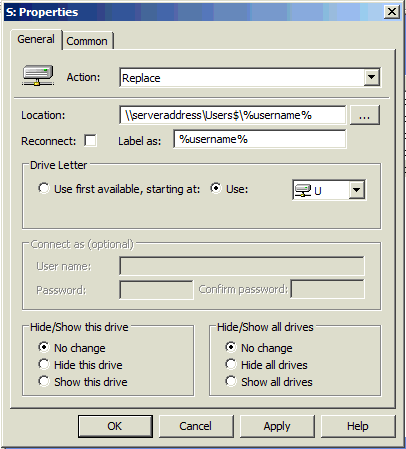
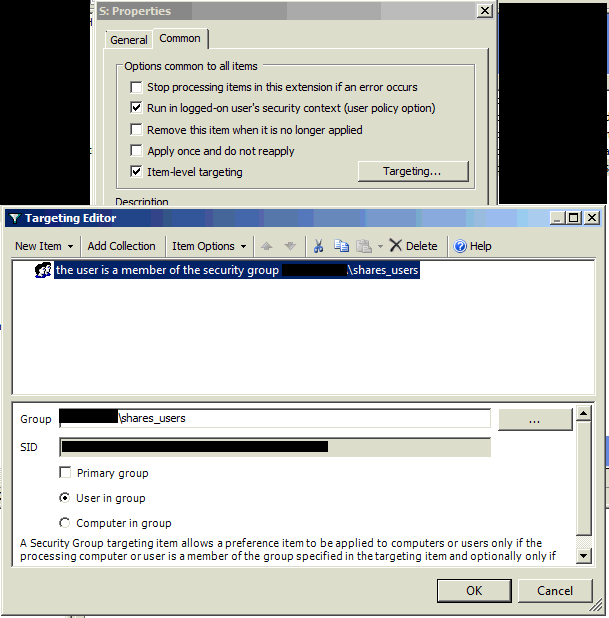
- Create group policy drive mount object for everyone with the following guidelines:
- Create an additional group policy drive mount for shares_users_management that mounts to the Users$ share so they can access all folders within, following similar guidelines set in the previous images
Note:
- if Active Directory has login scripts running to mount drives as well, you need to make sure the script doesn't use
net use * \d at all! Scripts run after group policy and therefore will simply disconnect the drive you just connected!
this document last modified: January 31 2020 00:16
popout article
permalink
Home / Windoze /